
Reports & Profit Management
Restaurant reporting software for better profit and cost control.
Tab2Kit helps cafes, restaurants and food shops turn daily activity into useful management information. Review sales, orders, stock, wastage, suppliers, staff, menu items and cost-control data from one connected system.
Instead of only seeing what was sold, Tab2Kit helps owners understand what those sales mean for stock usage, ingredient cost, supplier purchasing, staff activity and profit visibility.
Owner dashboard
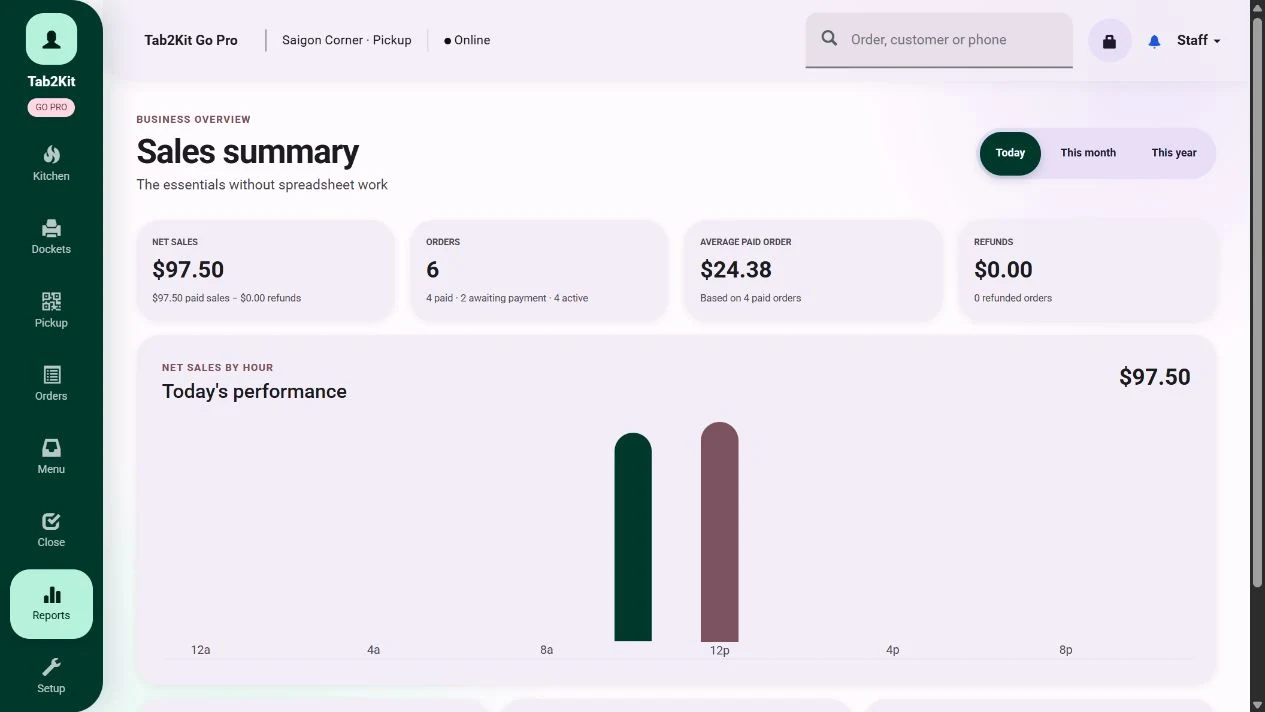
What it does
What Reports & Profit Management does
Tab2Kit gives owners and managers practical reports for understanding daily operations and long-term business performance.
Because Tab2Kit connects orders, kitchen workflow, inventory, recipes, suppliers and staff, reports can show more than basic sales numbers. They can support menu review, stock control, supplier cost analysis, staff activity review and profit-focused decisions.
Daily reports
Monthly reports
Yearly reports
Menu-item analysis
Stock movement visibility
Wastage review
Supplier purchasing visibility
Staff work summary
Cost-control reporting
Profit visibility
The goal is to help food businesses make decisions earlier, before small operational problems become serious margin problems.
Daily reports
Understand each trading day more clearly.
Daily reports help owners and managers review what happened during service and what needs attention before the next trading day.
Tab2Kit daily reports can support visibility across sales, orders, stock movement, staff activity and operational performance.
How many orders were processed today?
Which sales channels performed best?
Which menu items sold most?
Were there stock issues or wastage records?
Did staff attendance match the expected work summary?
Were supplier or purchasing activities recorded?
Are there cost issues that need immediate attention?
A good daily report helps the owner manage tomorrow better.
Monthly and yearly reports
Review performance over time.
Daily activity matters, but owners also need to understand trends. Monthly and yearly reports help food businesses review whether sales, cost, wastage, supplier prices and staff activity are moving in the right direction.
Tab2Kit supports longer-term reporting for business review and planning.
Longer-term reports help owners move from daily firefighting to better business control.
Monthly reports can help review
Sales trends
Menu-item performance
Stock movement
Wastage patterns
Supplier purchasing activity
Staff attendance and work summaries
Cost-control issues
Yearly reports can support
Long-term business review
Seasonal comparison
Menu strategy
Supplier strategy
Multi-location comparison
Profit and cost planning
Stock, wastage and inventory reports
Use stock data to improve cost control.
Inventory reports help owners understand what stock is available, what has moved, what has been wasted and what may be at risk.
Tab2Kit connects reporting with ingredient-level inventory so stock information can support better operating decisions.
This helps owners understand whether food cost problems are coming from sales volume, purchasing, wastage, expiry or preparation activity.
Supplier and purchasing reports
Review supplier and purchasing activity.
Supplier costs can affect menu margin quickly. When purchasing activity is not visible, owners may not realise that cost changes are reducing profit.
Tab2Kit connects supplier and purchasing data with reports so owners can review purchasing performance more clearly.
This helps owners understand how purchasing decisions affect inventory, recipes and menu profitability.
Purchase order activity
Supplier purchasing history
Supplier debt
Supplier price changes
Ingredient cost movement
Supplier price comparison
Stock received from suppliers
Supplier impact on recipe cost
Staff and attendance reports
Connect staff activity with operational reporting.
Staff cost and attendance are part of business control. Owners need to understand who worked, when they worked and how staff activity connects to daily operations.
Tab2Kit supports staff reporting through attendance records and work summaries.
This helps owners keep staff-related information connected to the broader operating system.
Time attendance
Work summaries
Attendance calculation
Role-based activity visibility
Location-based staff records
Daily staff coverage
Management review of staff activity
Profit and cash-flow style cost control
Control the numbers behind profit.
Profit is affected by more than sales. Ingredient costs, wastage, supplier pricing, staff activity, purchasing timing and menu pricing can all affect the final result.
Tab2Kit helps owners review cost-control information from connected operations.
This gives food businesses a stronger foundation for profit and cash-flow style management.
Cost-control questions
Are food costs increasing?
Which ingredients are driving cost pressure?
Which suppliers are becoming more expensive?
Which menu items need pricing review?
Is wastage reducing profit?
Are staff hours aligned with business activity?
Are unpaid supplier amounts creating pressure?
Which location or channel needs attention?
Why it matters
Why connected reports matter
A basic POS report may show sales. But sales alone do not explain profit.
Connected reporting helps owners understand not only what happened, but why it happened.
Related features
Related Tab2Kit features
Explore the operational modules that feed better reporting and profit visibility.
POS & Order Management
Connect sales and order activity to reports and menu analysis.
Learn moreInventory & Ingredient Management
Use stock, wastage, expiry and batch/lot data in reporting.
Learn moreBOM & Recipe Costing
Connect recipes and ingredient costs to menu-item profitability.
Learn moreSupplier & Purchasing Management
Use supplier prices, purchase orders and supplier debt in cost-control review.
Learn moreStaff Management
Connect attendance and work summaries to daily and monthly reports.
Learn moreMulti-Location Management
Review performance across multiple venues with clearer operational visibility.
Learn moreFAQ
Frequently asked questions
Practical answers about daily reports, menu analysis, stock, suppliers, staff and cost-control visibility.
Does Tab2Kit provide daily reports?
Yes. Tab2Kit supports daily reports to help owners review sales, orders, stock, staff activity and operational performance.
Does Tab2Kit provide monthly and yearly reports?
Yes. Tab2Kit supports monthly and yearly reports for longer-term review and business planning.
Can Tab2Kit analyse menu-item performance?
Yes. Tab2Kit supports menu-item analysis to help owners review sales, cost and margin-related performance.
Can reports include inventory and wastage data?
Yes. Inventory, stock movement, wastage, expiry and perishable stock information can support reporting and cost-control visibility.
Can reports include supplier and purchasing data?
Yes. Supplier records, purchase orders, supplier debt, supplier price comparison and purchasing activity can support reports.
Can reports include staff information?
Yes. Staff attendance, work summaries and attendance calculations can support staff-related reporting.
How is Tab2Kit reporting different from basic POS reporting?
Basic POS reporting usually focuses on sales and payments. Tab2Kit reporting is designed to connect sales with kitchen workflow, inventory, recipes, suppliers, staff and cost-control visibility.
Can reports support profit management?
Yes. Tab2Kit reports are designed to support menu-item analysis, food-cost visibility, purchasing review, wastage review and broader profit/cash-flow style cost control.
Reports, cost control and owner visibility
Ready to see more than sales totals?
Book a Tab2Kit demo and see how reports can connect orders, stock, recipes, suppliers, staff and profit visibility in one system.