
Menu & Flexible Pricing
Menu and flexible pricing software for food businesses.
Tab2Kit helps cafes, restaurants and food shops manage menu items and pricing rules with better cost visibility. Pricing can be managed by customer group, sales channel and input ingredient cost, while connecting menu decisions to recipes, suppliers, reports and profit visibility.
When ingredient prices change or different channels have different costs, menu pricing should not rely only on guesswork. Tab2Kit helps owners review pricing with clearer operational data.
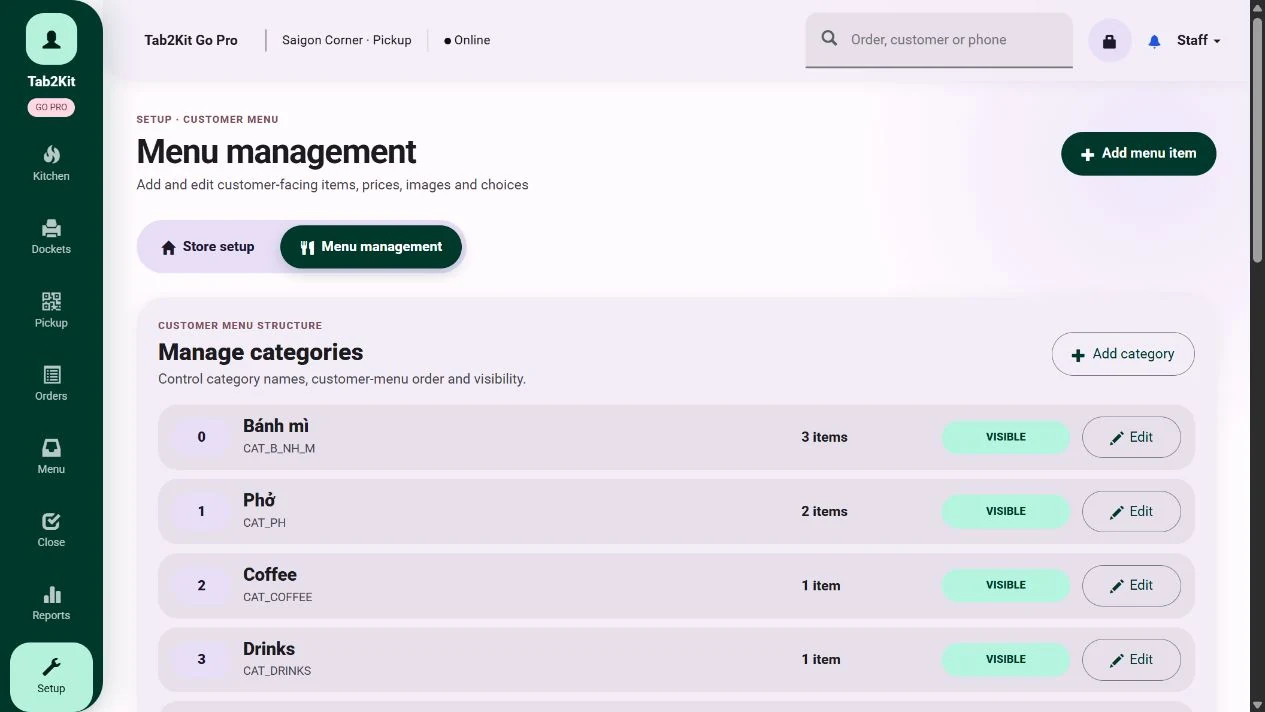
Menu management
What it does
What Menu & Flexible Pricing does
Tab2Kit helps food businesses manage menu items, pricing rules and pricing decisions across different operating situations.
A single menu item may be sold through dine-in, takeaway, QR ordering, online ordering or to different customer groups. The cost and margin may not be the same in every case.
Menu item management
Customer group pricing
Sales channel pricing
Ingredient cost-based pricing support
Recipe cost connection
Supplier cost connection
Menu-item analysis
Reports and profit visibility
Tab2Kit is designed to help owners manage pricing more flexibly, while connecting menu prices to ingredient cost, supplier cost and reporting.
Pricing by customer group
Set pricing by customer group.
Some food businesses serve different customer types. A business may have regular customers, wholesale customers, catering customers, corporate accounts or special customer groups.
Tab2Kit supports flexible pricing by customer group so owners can manage different price rules more clearly.
This helps owners manage pricing without manually adjusting every order.
Regular customer pricing
Wholesale pricing
Corporate or account customer pricing
Catering-related pricing
Special customer pricing
Promotional group pricing
Location or business-model differences
Pricing by sales channel
Set pricing by sales channel.
A menu item may not have the same cost profile across every sales channel. Dine-in, takeaway, QR ordering and online ordering may involve different packaging, service needs or business costs.
Tab2Kit supports pricing by sales channel so owners can manage prices more accurately across different ordering workflows.
This helps keep menu pricing aligned with the way customers order.
Dine-in
Counter orders
Takeaway
QR ordering
Table ordering
Online ordering
Location-specific channels
Special campaign channels
Pricing by input ingredient cost
Review pricing when ingredient costs change.
Ingredient costs can change quickly. When suppliers increase prices, the cost of recipes and menu items may change before owners notice.
Tab2Kit supports pricing decisions based on input ingredient cost visibility. This helps owners review whether menu prices still make sense when ingredient costs move.
Which ingredients increased in cost?
Which menu items are affected?
Which sales channels are most impacted?
Which prices may need review?
Which menu items have weak margins?
Which supplier changes are affecting pricing decisions?
Pricing should respond to real cost pressure, not only old assumptions.
Connected to recipes and food costing
Connect pricing with recipe cost.
A menu price is only meaningful when owners understand the cost behind it. Tab2Kit connects menu pricing with BOM and recipe costing, helping owners compare selling price against ingredient cost.
When pricing connects to recipe cost, owners can make decisions with stronger evidence.
Recipe-based cost calculation
Ingredient quantity review
Food-cost visibility
Menu-item margin review
Pricing review alerts or decisions
Profit-focused menu management
Connected to suppliers and purchasing
Connect pricing with supplier cost changes.
Supplier price changes can affect menu margin quickly. If the cost of meat, seafood, dairy, coffee beans, flour, vegetables, sauces or packaging increases, multiple menu items may be affected.
Tab2Kit helps connect supplier and purchasing data with menu pricing decisions.
When suppliers change prices, owners need to see the impact on menu profitability.
Supplier price comparison
Ingredient cost updates
Purchase order history
Supplier cost movement
Recipe cost review
Menu price review
Better purchasing and pricing decisions
Connected to reports and menu-item analysis
Use reports to review menu performance.
Menu pricing should be reviewed with real performance data. Some items sell well but have weak margins. Some items sell slowly but use expensive ingredients. Some channels may perform better than others.
Tab2Kit connects menu pricing with reports and menu-item analysis.
This helps owners manage the menu as a business asset, not just a product list.
Best-selling items
Low-selling items
High-cost items
Low-margin items
Channel-based performance
Customer group performance
Supplier cost impact
Pricing review opportunities
Profit and cost-control visibility
Why it matters
Why flexible pricing matters
Static pricing can be risky when ingredient costs, supplier prices and sales channels change.
Flexible pricing helps owners keep menu decisions closer to real operating conditions.
Related features
Related Tab2Kit features
Explore the operational data that makes menu pricing more useful.
BOM & Recipe Costing
Connect menu items to ingredients, quantities and food-cost calculations.
Learn moreSupplier & Purchasing Management
Use supplier prices and purchasing data to understand ingredient cost changes.
Learn moreReports & Profit Management
Review menu-item analysis, channel performance and cost-control visibility.
Learn moreInventory & Ingredient Management
Track ingredient stock, wastage, expiry and usage behind menu items.
Learn morePOS & Order Management
Apply menu pricing through the ordering and checkout workflow.
Learn moreFAQ
Frequently asked questions
Practical answers about menu items, customer groups, sales channels, ingredient cost and pricing visibility.
Does Tab2Kit support menu management?
Yes. Tab2Kit supports menu item management connected to orders, recipes, pricing and reports.
Can Tab2Kit support different prices for different customer groups?
Yes. Tab2Kit supports flexible pricing by customer group.
Can Tab2Kit support different prices by sales channel?
Yes. Tab2Kit supports pricing by sales channel, such as dine-in, takeaway, QR ordering and online ordering.
Can pricing connect to ingredient cost?
Yes. Tab2Kit supports pricing decisions based on input ingredient cost visibility.
Can pricing connect to recipe costing?
Yes. Menu pricing can connect with BOM and recipe costing so owners can understand the cost behind each menu item.
Can supplier cost changes affect pricing decisions?
Yes. Supplier and purchasing data can support ingredient cost visibility and menu pricing review.
Can reports help identify pricing problems?
Yes. Reports and menu-item analysis can help identify high-cost, low-margin or underperforming menu items.
Is flexible pricing useful for small cafes?
Yes. Even small cafes can benefit from clearer pricing when ingredient costs, takeaway packaging or online ordering channels affect margin.
Menu, cost and margin
Ready to price your menu with better cost visibility?
Book a Tab2Kit demo and see how menu items, customer groups, sales channels, ingredient costs, suppliers and reports can work together.