
Own a Direct Ordering Channel
Give customers a way to order directly from your business.
Online Ordering Website
Tab2Kit helps cafes, restaurants and food shops accept direct online orders through an ordering website connected to the wider operating system. Orders can connect to POS, kitchen display, payment workflow, inventory and reports.
Instead of treating online orders as a separate channel that staff must manually manage, Tab2Kit helps bring online ordering into the same workflow as dine-in, takeaway, QR and counter orders.
Online ordering website
What it does
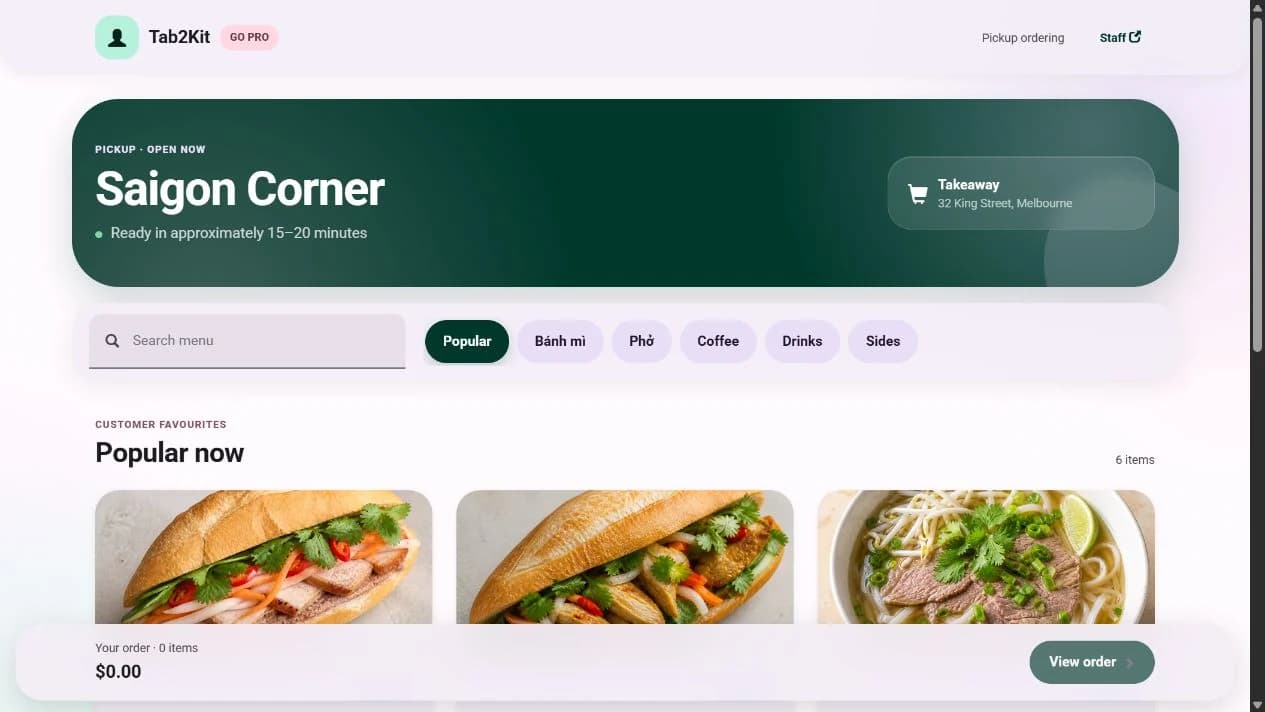
Tab2Kit's online ordering website gives customers a direct way to order from your food business.
Customers can browse menu items, place orders and use an ordering flow connected to your operations. This can support takeaway, pickup and other ordering models depending on how your business chooses to operate.
Direct online ordering
Menu browsing
Takeaway and pickup order support
Order status workflow
POS connection
Kitchen display connection
Payment workflow support
Inventory and report connection
The important difference is connection. Online orders should not sit separately from the system your staff and kitchen already use.
Direct customer ordering channel
Many food businesses rely heavily on third-party ordering or delivery platforms. These platforms can help bring orders, but they also place part of the customer relationship outside your control.
Tab2Kit supports the idea that your business should also have a direct ordering channel.
The goal is not only to receive orders online. The goal is to receive online orders in a way your business can manage properly.
A direct channel can help you
Connected to POS and order management
Online ordering becomes harder to manage when staff need to copy orders from one screen into another. Manual re-entry can create mistakes, delays and confusion.
Tab2Kit is designed to connect online orders with the broader POS and order management workflow.
When online ordering connects to order management, staff can work with clearer information.
Online order visibility
Order status
Takeaway or pickup flow
Staff-entered and customer-entered orders
Counter, table, QR and online orders in a connected system
Reporting from multiple ordering channels
Connected to kitchen display
An online order should not stay hidden in a separate dashboard or inbox. Kitchen staff need clear preparation information.
With Tab2Kit, online orders can connect to the kitchen display system or bump screen. This helps the kitchen see what needs to be prepared and manage order status more clearly.
Online ordering works best when the kitchen is part of the same system.
Online orders appearing in preparation workflow
Takeaway and pickup order preparation
Order status updates
Bump screen workflow
Less manual communication between front-of-house and kitchen
More consistent order handling across channels
Connected to payments
Tab2Kit supports Stripe-powered payment workflow, helping food businesses manage payment activity as part of the broader ordering process.
This can support a more connected order-to-payment model instead of separating order capture, payment handling and operational reporting.
The aim is to keep ordering and payment information aligned.
Order-to-payment workflow
Stripe-powered payment process
Payment status visibility
Mobile phone payment workflow for operational flexibility
Connection between payment activity and order records
Connected to inventory and reports
An online ordering website should do more than display a menu. When online orders connect to stock and reports, owners can better understand what customers are buying and how those orders affect the business.
Tab2Kit connects order data with the broader operations platform.
This helps owners understand whether online ordering is improving the business, not only increasing order volume.
Menu-item analysis
Ingredient inventory visibility
Recipe and food-cost review
Daily, monthly and yearly reports
Sales channel performance
Wastage and purchasing decisions
Profit and cost-control visibility
Connected ordering
Online ordering can become a problem when it creates another screen, another workflow and another place for staff to check.
A direct ordering channel is most useful when it is connected to the business behind it.
Benefits
A direct ordering website works best when it is connected to the way your team already runs service.
Give customers a way to order directly from your business.
Reduce the need to take every takeaway or pickup order by phone.
Bring online orders into the same operational flow as POS, QR, table and takeaway orders.
Send online orders to the kitchen display or bump screen.
Use reports to understand online order activity and menu-item performance.
Use online ordering as part of a broader system that can also support stock, suppliers, staff and profit control.
Related features
Explore how direct online ordering connects to POS, kitchen, payments and reports.
Support QR ordering, table ordering, takeaway ordering and online ordering workflows.
Learn moreManage staff-entered and customer-entered orders from one connected system.
Learn moreSend online orders to kitchen display or bump screen.
Learn moreSupport practical payment workflow connected to order records.
Learn moreReview online order activity, sales channel performance and menu-item analysis.
Learn moreFAQ
Practical answers about direct online orders, takeaway, pickup, POS, kitchen display, payments and reports.
Yes. Tab2Kit supports an online ordering website so customers can order directly from your food business.
Yes. The online ordering website can support takeaway and pickup-style ordering workflows depending on how your business chooses to operate.
Yes. Online orders can connect with Tab2Kit's POS and order management workflow.
Yes. Online orders can connect to the kitchen display system or bump screen.
Yes. Tab2Kit supports Stripe-powered payment workflow that can connect payment activity with order records.
Yes. Online order data can support ingredient inventory visibility, menu-item analysis, sales channel reporting and cost-control review.
No. The online ordering website can be useful for cafes, takeaway shops, bakeries, food shops and other food businesses that want a direct ordering channel.
Direct orders, connected operations
Book a Tab2Kit demo and see how an online ordering website can connect with POS, kitchen display, payments, stock and reports.