
Table
Take dine-in, takeaway, QR, online and table orders through one connected ordering workflow.
Cafe & Restaurant Operations Software
Tab2Kit helps Australian cafes and restaurants move beyond a basic POS. From table ordering and kitchen display to ingredient inventory, supplier purchasing, staff attendance and food-cost control, Tab2Kit connects the daily operations that affect your margin.
The problem
Many cafes and restaurants start with a POS, then slowly add spreadsheets, paper notes, supplier messages, staff rosters, kitchen dockets and separate reporting tools. The result is daily work that looks simple at the counter but becomes messy behind the scenes.
Orders do not always connect to stock.
Recipes do not always connect to food cost.
Supplier prices change without warning.
Staff hours need manual checking.
Waste and expiry issues are easy to miss.
Profit problems are often discovered too late.
Operating flow
Tab2Kit is built around the real operating flow of a food business.
Take dine-in, takeaway, QR, online and table orders through one connected ordering workflow.
Send orders directly to a cloud-based kitchen display or bump screen using any laptop or computer with internet.
Track ingredient-level inventory, wastage, expiry dates, batch/lot information and perishable stock alerts.
Manage suppliers, purchase orders, supplier debt and price comparison before ingredient costs damage your margin.
Record time attendance, work summaries and attendance calculations with role-based access control.
Use reports, menu-item analysis and food-cost visibility to understand what is selling, wasting and profitable.
Features
Product breadth without turning the website into an enterprise maze.
Use a real checkout screen on a touchscreen laptop or tablet, reducing dependency on expensive dedicated POS hardware.
Learn moreSend orders to a kitchen display or bump screen using any laptop or computer with internet.
Learn moreSupport QR ordering, table ordering, takeaway ordering and online ordering workflows.
Learn moreGive customers a direct ordering channel without relying only on third-party delivery marketplaces.
Learn moreManage dine-in orders, table service, order status and service flow more clearly.
Learn moreSupport practical payment workflows, including Stripe-powered payment using a mobile phone.
Learn moreTrack stock by ingredient, not only by finished menu item.
Learn moreConnect recipes, ingredients and cost calculations to understand true food cost.
Learn moreManage purchase orders, supplier debt, price comparison and purchasing control.
Learn moreTrack time attendance, work summaries and attendance calculations.
Learn moreReview daily, monthly and yearly performance with menu-item analysis and cost-control visibility.
Learn moreManage multiple venues with clearer control over products, stock, staff and reports.
Learn moreHardware setup
Tab2Kit is designed to reduce hardware dependency with flexible software workflows for small and growing food businesses.
Food cost control
Revenue is only one side of a food business. Tab2Kit helps connect sales to the costs behind each item.
Instead of only seeing what you sold, Tab2Kit helps you understand what each sale costs.
Supplier management
Ingredient prices change. Purchase orders, supplier debts and price comparison need to stay connected to food cost.
Tab2Kit software
Connected service dashboard
POS checkout
Table 8 total
$84.50
Kitchen display
Inventory and suppliers
Tomatoes low
Milk expiry soon
Supplier price change
Reports and profit
Food cost
28%
Margin view
Live
Staff operations
Staff cost and attendance are part of daily restaurant control. Tab2Kit keeps staff-related information connected to operations.
Record when staff work and support attendance calculation.
Review work summaries to understand daily staff activity and operational coverage.
Control what each staff member can access based on their role, location and responsibility.
Solutions
The English homepage stays broad for cafes, restaurants, takeaway, bakeries, food shops, multi-location groups and new business setup.
Manage counter orders, table orders, takeaway, staff and stock with one connected system.
Explore solutionConnect dine-in service, kitchen workflow, table management, supplier purchasing and reporting.
Explore solutionMove orders quickly from counter, QR or online channels to the kitchen.
Explore solutionControl recipes, ingredients, wastage, expiry dates and daily production-related stock.
Explore solutionManage multiple venues with clearer control over reports, stock, staff and pricing.
Explore solutionStart with a flexible software and hardware setup before investing in expensive dedicated devices.
Explore solutionWhy Tab2Kit
A practical system for food operators who need more than a checkout screen.
Tab2Kit does not stop at checkout. It connects orders, kitchen, inventory, suppliers, staff and profit control.
Use common devices such as touchscreen laptops, tablets, mobile phones and internet-connected computers.
Ingredient inventory, recipe costing, wastage, expiry tracking and supplier price comparison are part of the operating model.
Tab2Kit starts with the needs of Australian cafes, restaurants and food shops, with a product structure that can expand globally.
Owner reports
Reports
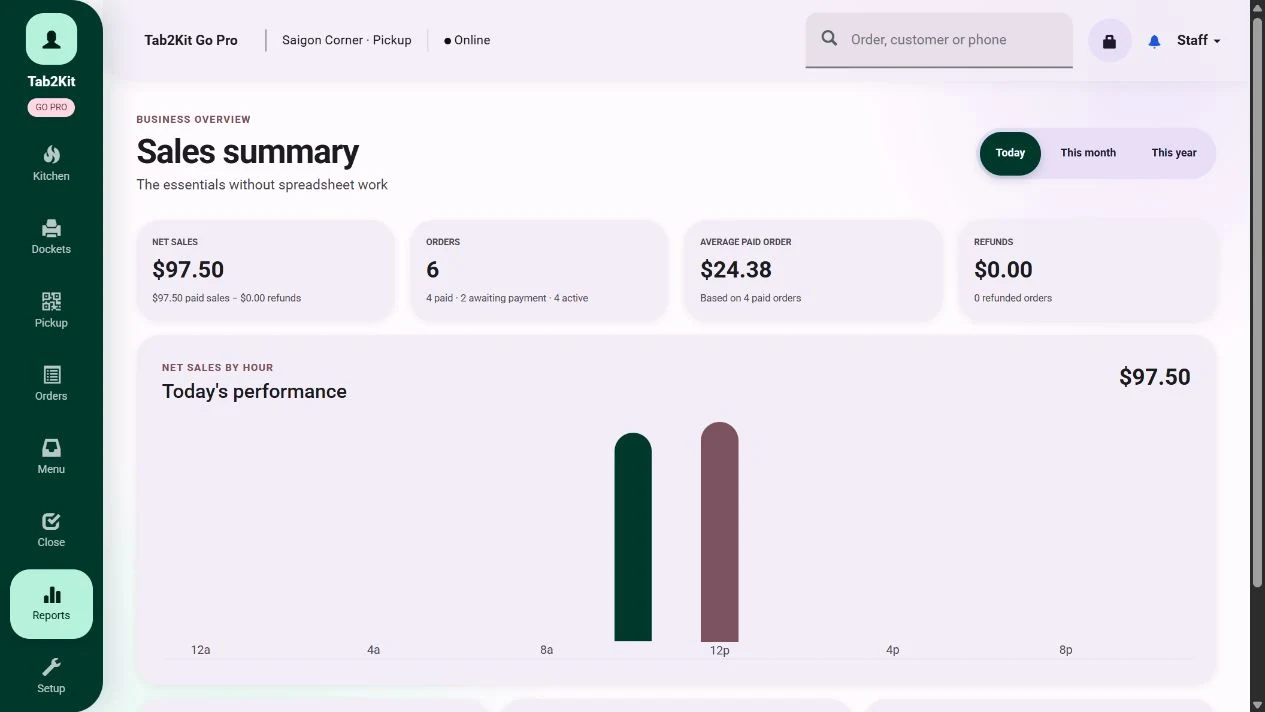
Tab2Kit gives owners and managers practical reports for better decision-making.
Understand sales, order flow and key activity for the day.
Review performance trends, stock movement, supplier activity and staff-related data.
Support longer-term planning with clearer operational history.
See which items sell, which items cost more than expected and which items may need pricing review.
Use connected data from orders, ingredients, suppliers and staff to improve margin control.
FAQ
Quick answers for operators comparing Tab2Kit with ordinary POS systems.
No. Tab2Kit includes POS and order management, but it is designed as cafe and restaurant operations software. It also supports kitchen workflow, inventory, recipes, suppliers, staff and reporting.
Not necessarily. Tab2Kit is designed to work with common devices such as touchscreen laptops, tablets, mobile phones and internet-connected computers.
Yes. Tab2Kit supports QR ordering, table ordering, takeaway ordering and online ordering workflows.
Yes. Tab2Kit supports ingredient-level inventory, BOM, recipes, food costing, wastage, expiry date, batch/lot tracking and perishable stock alerts.
Ready to see it?
Book a Tab2Kit demo and see how your orders, kitchen workflow, stock, suppliers, staff and profit reporting can work together.