
POS Orders
Orders entered by staff at the checkout screen can be sent to the kitchen display.
Kitchen Display System
Tab2Kit helps send orders from the counter, table, QR ordering, takeaway and online ordering directly to the kitchen. Kitchen staff can view and manage orders through a cloud-based kitchen display or bump screen using any laptop or computer with internet.
This helps reduce paper dockets, missed instructions and confusion between front-of-house and kitchen teams.
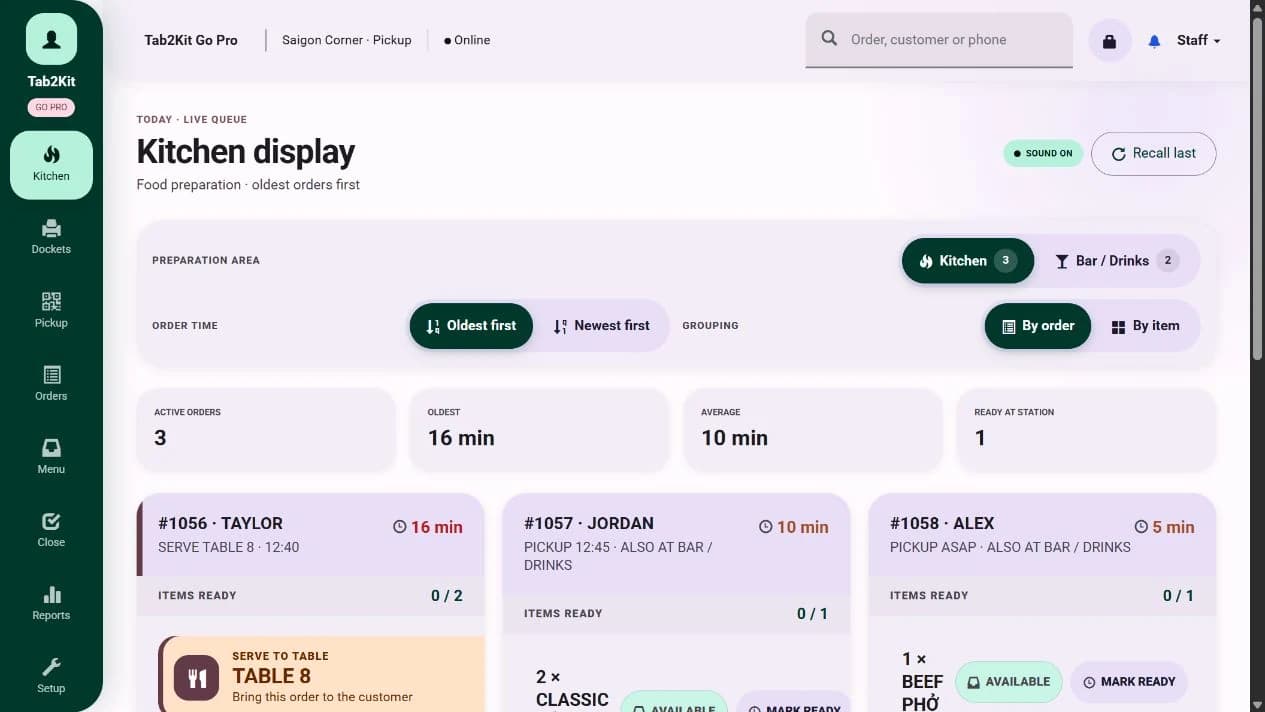
Kitchen display
What it does
Tab2Kit's Kitchen Display System helps kitchen staff see incoming orders clearly and manage preparation flow. Instead of relying only on printed dockets, handwritten notes or verbal instructions, orders can appear on a screen in the kitchen.
Display incoming orders
Show order details clearly
Support kitchen preparation flow
Use bump screen workflow
Update order status
Connect POS, QR, takeaway and online orders
Reduce manual communication between counter and kitchen
Staff can review order details, track preparation status and bump completed items or orders when they are ready. The kitchen display connects with the wider Tab2Kit order workflow, so information moves from order entry to preparation without being retyped or manually transferred.
Cloud-based bump screen
Tab2Kit's kitchen display is cloud-based. This gives cafes and restaurants a more flexible setup, especially when they want to reduce the cost of dedicated kitchen display hardware.
Order channels
Modern food businesses receive orders from more than one channel. Tab2Kit helps connect these order sources to the kitchen workflow.
Orders entered by staff at the checkout screen can be sent to the kitchen display.
Dine-in and table service orders can move from front-of-house to kitchen preparation.
Customer QR orders can connect into the kitchen workflow without being manually re-entered.
Takeaway orders can be displayed clearly for preparation and completion.
Online ordering can connect to the same preparation workflow instead of sitting in a separate system.
When order channels connect to one kitchen workflow, the team can work from clearer information.
Kitchen workflow benefits
A clear kitchen display helps the team understand what needs to be prepared, what is in progress and what has been completed.
Front-of-house to kitchen
Tab2Kit is designed around the flow from table to kitchen. Orders should not get stuck at the counter, lost in a message thread or manually rewritten for preparation.
Staff or customers place an order through POS, table, QR, takeaway or online ordering.
The order appears on the kitchen display or bump screen.
Kitchen staff prepare the order using the displayed information.
The order can be marked as completed when preparation is finished.
The order status can support clearer service and reporting.
Paper docket dependency
Paper dockets can work for simple service, but they become harder to manage when orders come from multiple channels or when the kitchen is busy.
Dockets being misplaced
Verbal changes being forgotten
Hard-to-read handwriting or notes
Unclear preparation status
Different channels creating separate workflows
Kitchen staff needing to ask the counter for updates
More than a screen
The Kitchen Display System is one part of Tab2Kit's connected operations platform. Orders shown in the kitchen can also connect with POS, QR ordering, takeaway ordering, online ordering, inventory, reports and menu-item analysis.
Related features
Kitchen display works best when order entry, QR ordering, table flow and reporting are connected.
Take orders through a real checkout screen and send them to the kitchen.
Learn moreLet customers order through QR, table, takeaway and online ordering workflows.
Learn moreGive customers a direct online ordering channel connected to your kitchen workflow.
Learn moreManage dine-in tables and service flow.
Learn moreUse order data to support daily reports, menu-item analysis and cost-control visibility.
Learn moreFAQ
Answers for cafe and restaurant owners comparing kitchen display and bump screen options.
A kitchen display system is a screen used by kitchen staff to view and manage incoming orders. It can help replace or reduce reliance on printed kitchen dockets.
Yes. Tab2Kit supports a kitchen display or bump screen workflow so kitchen staff can manage preparation status.
Not necessarily. Tab2Kit's kitchen display can run on any laptop or computer with internet.
Yes. Orders entered through the POS checkout screen can be sent to the kitchen display.
Yes. QR orders can connect into the same kitchen workflow.
Yes. Tab2Kit can support takeaway and online orders as part of the kitchen preparation workflow.
Yes. Because kitchen activity is connected to the broader order workflow, order data can support reporting and operational visibility.
Ready to connect your counter, ordering channels and kitchen?