
Counter Orders
Process payment after staff enter an order at the checkout screen.
Bill Splitting & Payment
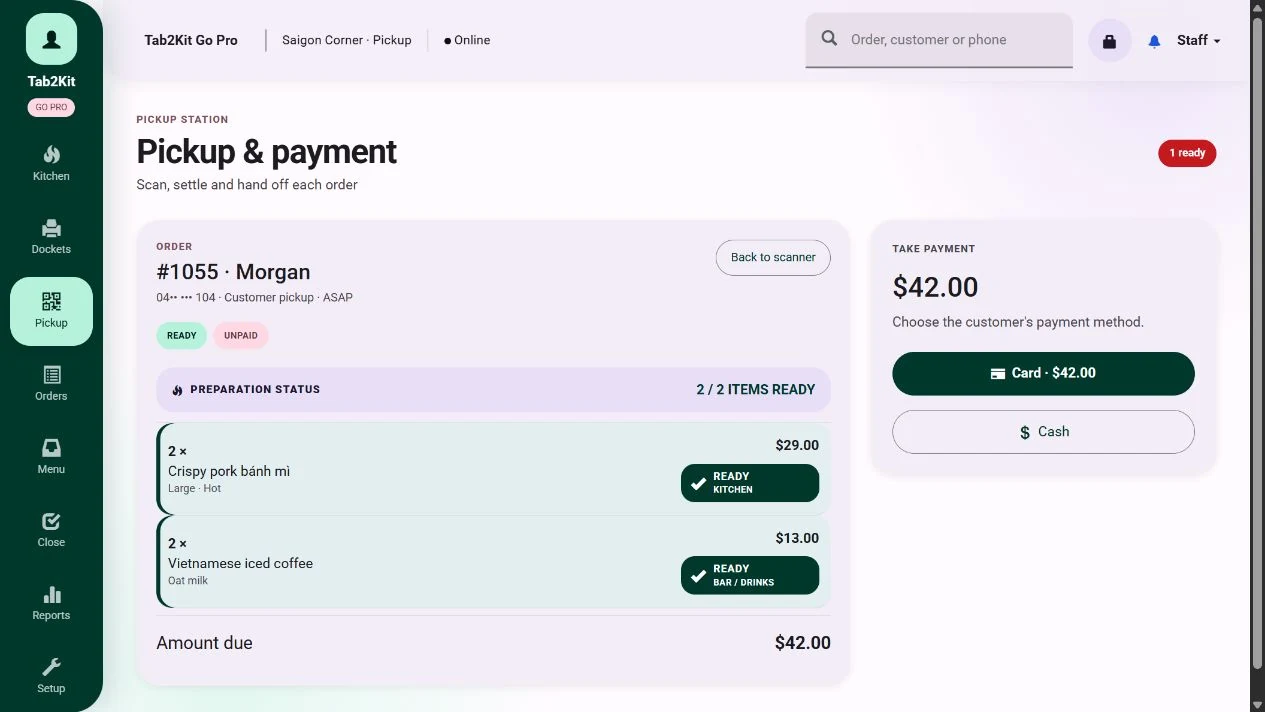
Tab2Kit helps food businesses manage bill handling, bill splitting and payment workflow as part of the order process. It supports Stripe-powered payment workflow using a mobile phone, helping reduce dependency on external payment devices.
Payments should not sit separately from orders. Tab2Kit helps connect payment activity with POS, table orders, QR ordering, order status and reports.
Payment workflow
What it does
Tab2Kit helps staff manage the final part of the order journey: bill handling and payment workflow.
For cafes and restaurants, payments may happen at the counter, after dine-in service, after a table order, or after a takeaway order. Customers may also want a bill split between people or items.
Bill handling
Bill splitting
Order-to-payment workflow
Stripe-powered payment process
Mobile phone payment workflow
Payment status visibility
Connection to POS orders
Connection to table orders
Connection to reports
Tab2Kit is designed to keep bill handling connected to the order record, table activity and reporting.
Order types
Food businesses do not process only one type of order. Tab2Kit helps support practical bill handling across multiple workflows.
Process payment after staff enter an order at the checkout screen.
Prepare the bill after customers finish their dine-in service.
Connect bill handling to open table orders and table status.
Support customer-submitted QR orders as part of the same ordering workflow.
Connect takeaway order status with payment handling and completion.
Keep online order records aligned with payment and reporting workflows.
This helps keep the payment process connected to the way the order was created.
Bill splitting for dine-in service
Bill splitting is common in dine-in environments. Customers may want to split the bill evenly, pay for selected items or separate payment between people at the same table.
Tab2Kit supports bill splitting as part of the order and table workflow.
Bill splitting should be simple for staff and clear for customers.
Review the open order
Prepare the bill
Split the bill when needed
Connect split payment activity with the order record
Reduce confusion during busy service
Keep payment status clearer
Stripe-powered payment workflow
Tab2Kit supports payment workflow using Stripe. This gives food businesses a practical way to connect payment activity with order records.
The aim is to keep payment handling part of the operating system, not an isolated step after the order is complete.
Order-to-payment connection
Payment status visibility
Mobile phone payment workflow
Reduced dependency on separate external payment devices
Payment activity connected to reporting
Mobile phone payment workflow
Tab2Kit is designed to support payment workflow using a mobile phone. This can help reduce the need for separate payment hardware, especially for new businesses or operators looking for a flexible setup.
Staff prepares the order or bill
Payment is initiated through the Tab2Kit workflow
A mobile phone is used in the Stripe-powered payment process
Payment status is connected to the order record
Reports can include payment-related activity
This helps food businesses keep the payment process more flexible and connected.
Lower hardware dependency
Many restaurant technology setups require separate payment devices. For some businesses, this adds cost, setup complexity and another device to manage.
Tab2Kit supports a more flexible approach.
This fits Tab2Kit's broader approach: use practical devices where possible and keep operations connected.
Connected to POS, tables and QR orders
Payment handling works best when it connects to the order source.
Tab2Kit helps connect payment workflow with POS, table management, QR ordering, takeaway ordering and online ordering.
This gives staff a clearer view from order entry to final payment.
Payment after POS order entry
Payment for table orders
Payment after bill splitting
Payment for QR/table ordering workflows
Payment for takeaway and online orders
Payment status connected to order status
Order and payment records connected to reports
Connected to reports and payment visibility
Owners need to understand not only what was ordered, but also how payment activity connects to sales, channels, tables and daily operations.
Tab2Kit connects payment workflow with reports and order data.
This helps owners and managers keep better visibility over the final step of the customer transaction.
Paid and unpaid order status
Payment activity by order type
Dine-in and takeaway payment activity
Bill splitting activity
Sales channel performance
Daily order-to-payment flow
Payment records connected to reporting
Why it matters
Payment is one of the most important parts of the customer journey. When payment handling is disconnected from orders, staff may need to manually reconcile information or check multiple systems.
Connected payment workflow helps reduce confusion at the point where accuracy matters most.
Related features
Explore how bill and payment workflow connects to orders, tables, QR, online ordering and reports.
Connect payment workflow with counter orders, dine-in orders and takeaway orders.
Learn moreSupport bill handling and payment workflow for dine-in table service.
Learn moreConnect customer-submitted orders with order status and payment workflow.
Learn moreAccept direct online orders connected to payment workflow and reports.
Learn moreReview order, payment and sales activity through connected reports.
Learn moreFAQ
Practical answers about bill splitting, Stripe-powered workflow, mobile payments, order records and reports.
Yes. Tab2Kit supports bill splitting as part of the order and payment workflow.
Yes. Tab2Kit supports practical payment workflow connected to order records, table activity and reports.
Yes. Tab2Kit supports Stripe-powered payment workflow.
Yes. Tab2Kit supports a mobile phone payment workflow using Stripe.
Tab2Kit is designed to reduce dependency on external payment devices by supporting Stripe-powered mobile payment workflow. The best setup may depend on your business requirements and payment preferences.
Yes. Payment workflow can connect with POS and order management.
Yes. Payment workflow can connect with table orders, bill handling and bill splitting.
Yes. Payment-related activity can support order, sales and operational reporting.
Orders, bills and payments
Book a Tab2Kit demo and see how bill splitting, Stripe-powered payment workflow, mobile phone payment and reports can work together.